peek
Images in the terminal: Claude shows the pictures it makes or finds inline, as real pixels in kitty and Ghostty and as a colored-block preview elsewhere
newrowsguardcommandprompttool

Images in the terminal: Claude shows the pictures it makes or finds inline, as real pixels in kitty and Ghostty and as a colored-block preview elsewhere
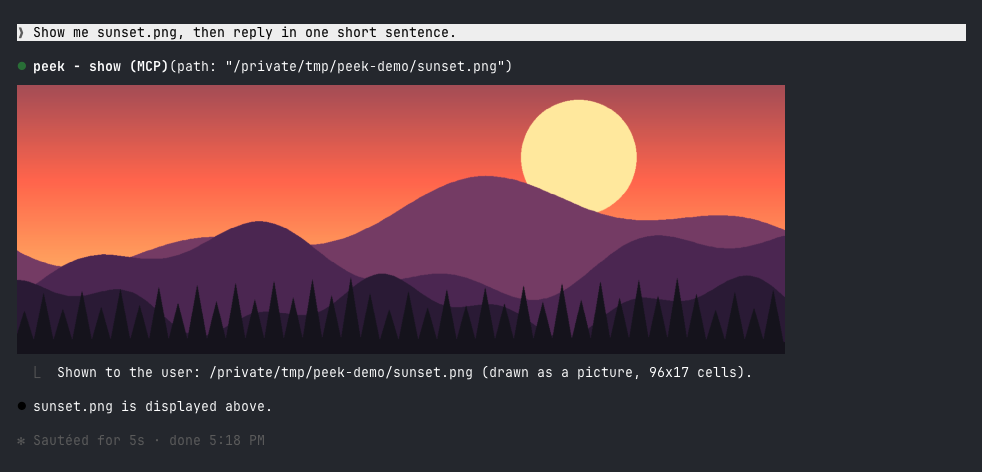
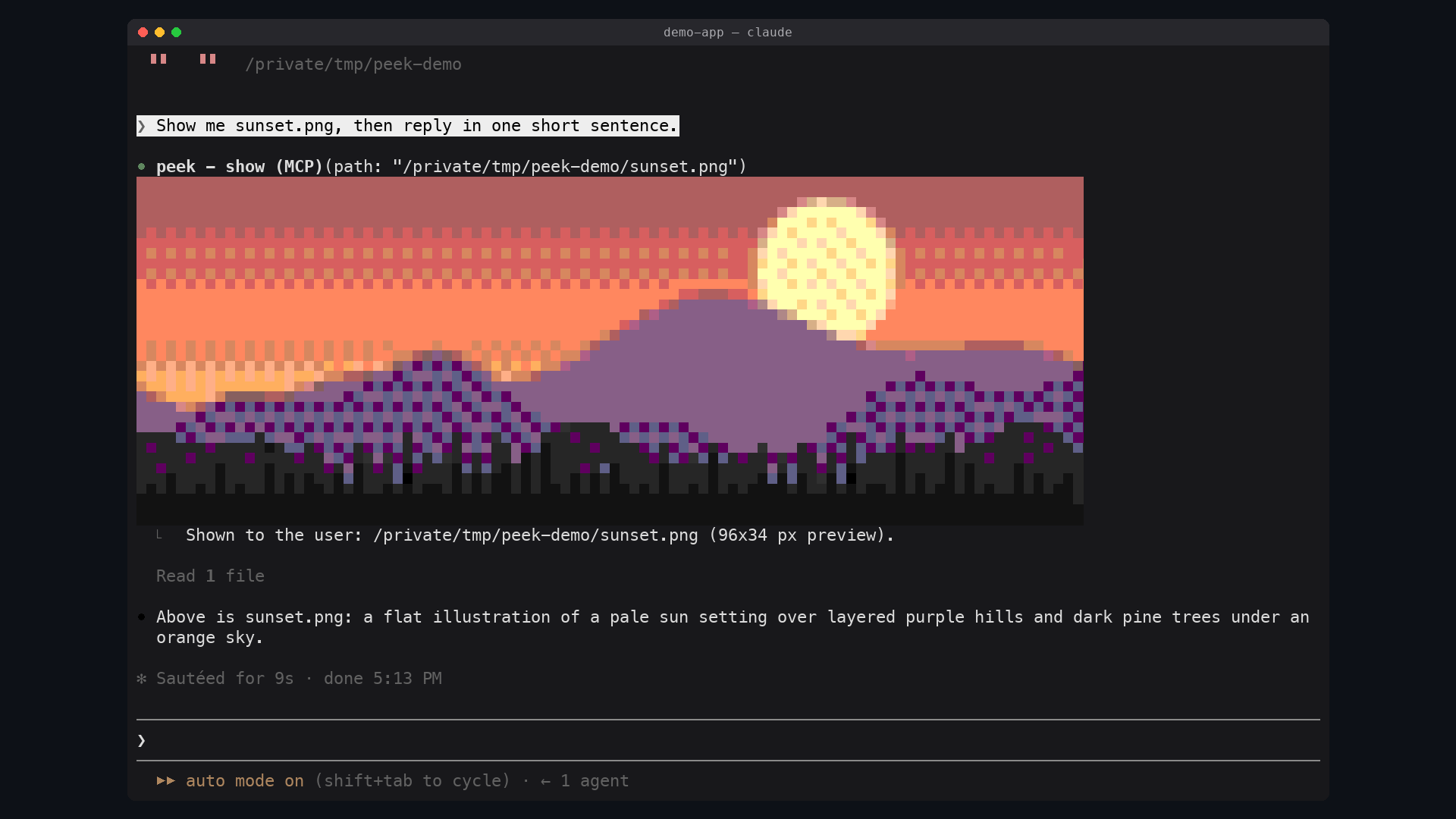
Images in the terminal. When Claude makes, downloads, captures or finds an image you should look at, it shows it to you inline, under its tool call, without you opening a browser or your phone.
In Ghostty or kitty it is the real picture:
In other terminals it is a colored-block preview:
| Terminal | What peek draws |
|---|---|
| Ghostty, kitty | The real picture, in pixels |
| Apple Terminal, iTerm2, WezTerm, VS Code's terminal, anything inside tmux | A colored-block preview, about 160x96 pixels at most |
| Claude Code Desktop, the mobile app | Nothing: the tool row only |
The reason is what a terminal can draw. Every terminal draws text: a grid of cells, each one character with a text and a background color. A real picture needs the terminal to implement a graphics protocol, a way for a program to hand it pixels. Claude Code draws a mod's pictures through the kitty graphics protocol, which kitty and Ghostty implement. Apple Terminal implements none, and Claude Code does not promise pictures in the others.
Elsewhere peek fakes the picture with text: each cell is an upper half block ▀ whose text color paints one pixel and whose background paints the one below it, so a cell holds two pixels. Claude Code draws these in the 256-color palette even where the terminal has more, so peek picks the palette colors itself, by how close they look, and lightly dithers between them.
sips, which ships with it/plugin marketplace add alex2481kobe/claude-mods
/plugin install peek@claude-modsAsk for an image the way you would anyway ("show me the screenshot", "make a chart of this and let me see it"). Claude calls the show tool on its own.
You can also show one yourself:
/peek ~/Desktop/screenshot.pngAny format macOS opens works: PNG, JPEG, HEIC, GIF, TIFF, BMP.
$.tool.register adds the show tool (mcp__peek__show). Claude Code may defer a plugin's tool, which hides its description until it is loaded, so a prompt.compose hook also adds a short section to the system prompt: to let you see an image, call show. Reading an image shows it only to Claude.TERM_PROGRAM=ghostty, or KITTY_WINDOW_ID set) the picture is an Image element over a PNG copy of the image in $TMPDIR/peek/. The terminal reads that file itself at every redraw, and Claude Code refuses a file on a network or device path, so the copy keeps the picture working when the original moves or lives on a mounted volume.sips scales the image and writes an uncompressed BMP, which peek decodes, fits to the 256-color palette (nearest in CIE Lab, then Floyd-Steinberg at a quarter strength) and draws as a Raster of half blocks.ui.render hook on the tool's row, and on /peek's output row, draws the picture under it.The dither strength was measured, not guessed: on live captures of a 256-color terminal, a quarter strength cut the error you see at a glance by 8-22% against no dithering, without the checkerboard that stronger dithering leaves in this palette.
$TMPDIR/peek/, which macOS clears with the rest of the temporary folder.claude plugin validate plugins/peek
claude plugin test plugins/peek
claude --plugin-dir plugins/peekhooks/register.tsx 206 lines1import { atom, read, update } from 'claude-code'
2import type { EngineInterface, Register } from 'claude-code'
3
4import type { Picture } from '../types'
5import { decodeBmp } from './bmp'
6import { pictureOf } from './cells'
7import { quantize } from './palette'
8
9// Pictures by the row that shows them: `command:<args>` for /peek, the
10// tool_use_id for the model's show tool.
11const pictures = atom({ plugin: 'peek', key: 'pictures' } as const, {})
12
13const TOOL = 'mcp__peek__show'
14const MAX_COLUMNS = 160
15
16const DESCRIPTION = [
17 'Shows an image file to the user, drawn inline in their terminal.',
18 'Reading an image only lets you see it; the user sees nothing. When the user asks to see, view or',
19 'look at an image, call this tool (you may also Read it to describe it).',
20 'The user may have no other way to see images from this session, so call it whenever you create,',
21 'download, capture, edit or point to an image they should look at: screenshots, renders, charts,',
22 'photos, generated assets, before/after comparisons. Show the image itself rather than describing',
23 "it. It is a low-resolution preview: fine text in it will not be readable, so say what it contains.",
24 'Accepts PNG, JPEG, HEIC, GIF, TIFF, BMP and other formats macOS can open.',
25].join(' ')
26
27// The tool may be deferred, its description unseen until loaded, so the
28// system prompt says when to reach for it.
29const GUIDANCE = [
30 `# Showing images`,
31 `The user is in a terminal and may have no other way to see image files. To let them see an image,`,
32 `one you made, downloaded or captured, or one they ask to see, call ${TOOL} with its path: it draws`,
33 `a preview inline. Reading an image lets only you see it, and \`open\` pops up a window they may not be watching.`,
34].join('\n')
35
36export const register: Register = on => {
37 // The width the last command reported; the model's tool call carries none.
38 let columns = 100
39
40 on('session.start', async ($, e, next) => {
41 const result = await next(e)
42 await $.command
43 .register({ name: 'peek', description: 'Draw an image in the transcript: /peek <path>', immediate: true })
44 .catch(err => $.ui.log(`peek: /peek not registered: ${err}`))
45 await $.tool
46 .register({
47 name: 'show',
48 description: DESCRIPTION,
49 inputSchema: {
50 type: 'object',
51 properties: { path: { type: 'string', description: 'Absolute path, or relative to the working directory' } },
52 required: ['path'],
53 },
54 })
55 .catch(err => $.ui.log(`peek: show tool not registered: ${err}`))
56 return result
57 })
58
59 on('prompt.compose', async ($, e, next) => {
60 const result = await next(e)
61 if (!e.surfaces.includes('terminal')) return result
62 return { sections: [...result.sections, { id: 'peek:show', text: GUIDANCE, scope: 'session' as const }] }
63 })
64
65 on('command.run', { command: 'peek' }, async ($, e) => {
66 columns = e.presentation.columns
67 const path = await expand($, e.args)
68 if (path === '') return { text: 'Usage: /peek <path to an image>' }
69 try {
70 return { text: `${path} ${describe(await keep($, `command:${e.args}`, path, columns))}` }
71 } catch (err) {
72 return { text: err instanceof Error ? err.message : String(err) }
73 }
74 })
75
76 on('tool.call', { tool: TOOL }, async ($, e) => {
77 const path = await expand($, typeof e.path === 'string' ? e.path : '')
78 try {
79 const text = `Shown to the user: ${path} ${describe(await keep($, e.tool_use_id, path, columns))}.`
80 return { result: text, text }
81 } catch (err) {
82 const text = `Could not show ${path || 'the image'}: ${err instanceof Error ? err.message : String(err)}`
83 return { result: text, text, isError: true }
84 }
85 })
86
87 on('ui.render', { component: 'CommandOutput', props: { command: 'peek' } }, async ($, e, next) => {
88 const picture = (await read($, pictures))[`command:${e.props.args}`]
89 if (picture === undefined || e.surface !== 'terminal') return next(e)
90 const { Box, Image, Raster } = $.ui.resolve(e)
91 return (
92 <Box flexDirection="column">
93 {await next(e)}
94 {picture.kind === 'photo' ? (
95 <Image key="picture" source={{ file: picture.file, format: 'png' }} columns={picture.columns} rows={picture.rows} alt={picture.file} />
96 ) : (
97 <Raster key="picture" columns={picture.columns} rows={picture.rows} cells={picture.cells} />
98 )}
99 </Box>
100 )
101 })
102
103 on('ui.render', { component: 'ToolUse', props: { tool: TOOL } }, async ($, e, next) => {
104 const picture = (await read($, pictures))[e.requestId]
105 if (picture === undefined || e.surface !== 'terminal') return next(e)
106 const { Box, Image, Raster } = $.ui.resolve(e)
107 return (
108 <Box flexDirection="column">
109 {await next(e)}
110 {picture.kind === 'photo' ? (
111 <Image key="picture" source={{ file: picture.file, format: 'png' }} columns={picture.columns} rows={picture.rows} alt={picture.file} />
112 ) : (
113 <Raster key="picture" columns={picture.columns} rows={picture.rows} cells={picture.cells} />
114 )}
115 </Box>
116 )
117 })
118}
119
120const describe = (picture: Picture) =>
121 picture.kind === 'photo'
122 ? `(drawn as a picture, ${picture.columns}x${picture.rows} cells)`
123 : `(${picture.columns}x${picture.rows * 2} px preview)`
124
125// Loads the picture and keeps it for the row that shows it.
126const keep = async ($: EngineInterface, key: string, path: string, columns: number) => {
127 const picture = await loadPicture($, path, Math.min(MAX_COLUMNS, columns - 4))
128 await update($, pictures, all => ({ ...all, [key]: picture }))
129 return picture
130}
131
132// `~` as the home folder, a relative path under the session's directory: the
133// terminal reads a photo's file itself, so it needs an absolute path.
134const expand = async ($: EngineInterface, raw: string) => {
135 const path = raw.trim().replace(/^~(?=\/|$)/, (await $.env.get('HOME')) ?? '')
136 return path === '' || path.startsWith('/') ? path : `${await $.session.cwd()}/${path}`
137}
138
139const MAX_ROWS = 48 // cell rows
140const DITHER = 0.25
141
142// Reads any image sips can open (PNG, JPEG, HEIC, GIF, TIFF, ...) and fits it
143// to `columns` cells across and MAX_ROWS down: as a PNG the terminal draws
144// itself where it has kitty graphics, as Raster cells elsewhere. Throws an
145// Error whose message is fit to show the person.
146const loadPicture = async ($: EngineInterface, path: string, columns: number): Promise<Picture> => {
147 // sips only warns, and exits 0, on a file it cannot open.
148 if (!(await $.fs.exists(path).catch(() => false))) throw new Error(`no such file: ${path}`)
149 const [width, height] = await probe($, path)
150 return (await hasKittyGraphics($))
151 ? loadPhoto($, path, width, height, columns)
152 : loadCells($, path, width, height, columns)
153}
154
155// The Image element draws real pixels on kitty and Ghostty, and its alt text
156// elsewhere; each says so in its environment.
157const hasKittyGraphics = async ($: EngineInterface) =>
158 (await $.env.get('TERM_PROGRAM')) === 'ghostty' || (await $.env.get('KITTY_WINDOW_ID')) !== undefined
159
160// A box of cells as wide as fits that keeps the picture's aspect: a cell is
161// about twice as tall as it is wide. The terminal reads the file at every
162// draw, and the engine refuses a file on a network or device path, so it
163// always draws a local PNG copy, kept for the session.
164const loadPhoto = async ($: EngineInterface, path: string, width: number, height: number, columns: number): Promise<Picture> => {
165 const dir = `${await tmpdir($)}peek`
166 await $.process.run(['mkdir', '-p', dir])
167 const file = `${dir}/${await $.clock.now()}-${Math.random().toString(36).slice(2)}.png`
168 const sips = await $.process.run(['sips', '-s', 'format', 'png', path, '--out', file])
169 if (sips.exitCode !== 0 || !(await $.fs.exists(file))) {
170 throw new Error(`could not read ${path} as an image: ${sips.stderr.trim() || sips.stdout.trim()}`)
171 }
172 const cols = Math.max(1, Math.min(columns, 255, Math.round((MAX_ROWS * 2 * width) / height)))
173 const rows = Math.max(1, Math.min(MAX_ROWS, Math.round((cols * height) / width / 2)))
174 return { kind: 'photo', columns: cols, rows, file }
175}
176
177const loadCells = async ($: EngineInterface, path: string, width: number, height: number, columns: number) => {
178 // sips (built into macOS) writes an uncompressed BMP, which needs no
179 // decoder library to read. A half-block pixel is about square.
180 const scale = Math.min(columns / width, (MAX_ROWS * 2) / height, 1)
181 const size = [height, width].map(n => String(Math.max(1, Math.round(n * scale))))
182 const tmp = `${await tmpdir($)}peek-${await $.clock.now()}-${Math.random().toString(36).slice(2)}.bmp`
183 try {
184 const sips = await $.process.run(['sips', '-s', 'format', 'bmp', '--resampleHeightWidth', ...size, path, '--out', tmp])
185 if (sips.exitCode !== 0 || !(await $.fs.exists(tmp))) {
186 throw new Error(`could not read ${path} as an image: ${sips.stderr.trim() || sips.stdout.trim()}`)
187 }
188 const { base64 } = await $.fs.read(tmp, { as: 'bytes' })
189 const pixels = decodeBmp(Uint8Array.fromBase64(base64))
190 return pictureOf(quantize(pixels, DITHER), pixels.width, pixels.height)
191 } finally {
192 await $.process.run(['rm', '-f', tmp]).catch(() => undefined)
193 }
194}
195
196const tmpdir = async ($: EngineInterface) => ((await $.env.get('TMPDIR')) ?? '/tmp').replace(/\/?$/, '/')
197
198// The image's pixel width and height, as sips reads them.
199const probe = async ($: EngineInterface, path: string): Promise<[number, number]> => {
200 const info = await $.process.run(['sips', '-g', 'pixelWidth', '-g', 'pixelHeight', path])
201 const width = Number(/pixelWidth: (\d+)/.exec(info.stdout)?.[1] ?? 0)
202 const height = Number(/pixelHeight: (\d+)/.exec(info.stdout)?.[1] ?? 0)
203 if (width === 0 || height === 0) throw new Error(`could not read ${path} as an image`)
204 return [width, height]
205}
206hooks/bmp.ts 43 lines1// Decodes the uncompressed 24- or 32-bit BMP that sips writes. Throws on
2// anything else, naming what it found.
3
4export type Pixels = {
5 width: number
6 height: number
7 // Row-major, top row first, 4 bytes per pixel: r, g, b, and 0 for a
8 // transparent pixel or 255 otherwise.
9 rgba: Uint8Array
10}
11
12export const decodeBmp = (bytes: Uint8Array): Pixels => {
13 const view = new DataView(bytes.buffer, bytes.byteOffset, bytes.byteLength)
14 if (bytes.length < 54 || view.getUint16(0, true) !== 0x4d42) throw new Error('not a BMP')
15
16 const offset = view.getUint32(10, true)
17 const width = view.getInt32(18, true)
18 const rawHeight = view.getInt32(22, true)
19 const bits = view.getUint16(28, true)
20 const compression = view.getUint32(30, true)
21 if (bits !== 24 && bits !== 32) throw new Error(`BMP of ${bits} bits per pixel`)
22 if (compression !== 0 && compression !== 3) throw new Error(`BMP compression ${compression}`)
23
24 const height = Math.abs(rawHeight)
25 const isBottomUp = rawHeight > 0
26 const step = bits / 8
27 const stride = Math.ceil((width * step) / 4) * 4
28 const rgba = new Uint8Array(width * height * 4)
29
30 for (let y = 0; y < height; y++) {
31 const row = offset + (isBottomUp ? height - 1 - y : y) * stride
32 for (let x = 0; x < width; x++) {
33 const at = row + x * step
34 const to = (y * width + x) * 4
35 rgba[to] = bytes[at + 2] ?? 0
36 rgba[to + 1] = bytes[at + 1] ?? 0
37 rgba[to + 2] = bytes[at] ?? 0
38 rgba[to + 3] = bits === 32 && bytes[at + 3] === 0 ? 0 : 255
39 }
40 }
41 return { width, height, rgba }
42}
43hooks/cells.ts 31 lines1import type { Cells } from '../types'
2import { TRANSPARENT } from './palette'
3
4const UPPER_HALF = 0x2580 // '▀': foreground paints the top pixel, background the bottom
5const LOWER_HALF = 0x2584 // '▄': for a transparent top pixel, foreground paints the bottom
6const SPACE = 0x20
7const DEFAULT = 0x01000000 // the terminal's own color
8
9// Raster cells for `colors` (0xRRGGBB or TRANSPARENT, row-major), two pixel
10// rows per cell row.
11export const pictureOf = (colors: Int32Array, width: number, height: number): Cells => {
12 const at = (x: number, y: number) => (y < height ? (colors[y * width + x] ?? TRANSPARENT) : TRANSPARENT)
13 const rows = Math.ceil(height / 2)
14 const words = new Uint32Array(width * rows * 3)
15 for (let r = 0; r < rows; r++) {
16 for (let x = 0; x < width; x++) {
17 const top = at(x, r * 2)
18 const bottom = at(x, r * 2 + 1)
19 const bg = bottom === TRANSPARENT ? DEFAULT : bottom
20 // A default foreground is the text color, not the background: never
21 // paint a transparent pixel with the foreground.
22 const cell =
23 top !== TRANSPARENT ? [UPPER_HALF, top, bg]
24 : bottom !== TRANSPARENT ? [LOWER_HALF, bottom, DEFAULT]
25 : [SPACE, DEFAULT, DEFAULT]
26 words.set(cell, (r * width + x) * 3)
27 }
28 }
29 return { kind: 'cells', columns: width, rows, cells: new Uint8Array(words.buffer).toBase64() }
30}
31hooks/palette.ts 81 lines1import type { Pixels } from './bmp'
2
3// Fits pixels to the xterm 256-color palette. The engine draws a Raster in
4// these 256 colors even where the terminal reports 24-bit color, and keeps
5// colors 16..255 as given; it would otherwise round each pixel itself, which
6// measured worse than this (live: 16.2 against 14.3 mean delta-E).
7
8export const TRANSPARENT = -1
9
10const LEVELS = [0, 95, 135, 175, 215, 255]
11
12const XTERM: readonly number[] = [
13 ...LEVELS.flatMap(r => LEVELS.flatMap(g => LEVELS.map(b => (r << 16) | (g << 8) | b))),
14 ...Array.from({ length: 24 }, (_, i) => 8 + 10 * i).map(v => (v << 16) | (v << 8) | v),
15]
16
17type Lab = [number, number, number]
18
19const linear = (c: number) => {
20 const u = c / 255
21 return u <= 0.04045 ? u / 12.92 : ((u + 0.055) / 1.055) ** 2.4
22}
23const curve = (v: number) => (v > 0.008856 ? Math.cbrt(v) : 7.787 * v + 16 / 116)
24
25const labOf = (r: number, g: number, b: number): Lab => {
26 const [lr, lg, lb] = [linear(r), linear(g), linear(b)]
27 const x = curve((0.4124 * lr + 0.3576 * lg + 0.1805 * lb) / 0.95047)
28 const y = curve(0.2126 * lr + 0.7152 * lg + 0.0722 * lb)
29 const z = curve((0.0193 * lr + 0.1192 * lg + 0.9505 * lb) / 1.08883)
30 return [116 * y - 16, 500 * (x - y), 200 * (y - z)]
31}
32
33const XTERM_LAB = XTERM.map(c => labOf(c >> 16, (c >> 8) & 0xff, c & 0xff))
34
35// The palette color that looks closest (nearest in CIE Lab).
36export const nearest = (r: number, g: number, b: number): number => {
37 const [l, a, bb] = labOf(r, g, b)
38 let best = 0
39 let bestDistance = Infinity
40 XTERM_LAB.forEach(([pl, pa, pb], i) => {
41 const d = (l - pl) ** 2 + (a - pa) ** 2 + (bb - pb) ** 2
42 if (d < bestDistance) [best, bestDistance] = [i, d]
43 })
44 return XTERM[best] ?? 0
45}
46
47// Each pixel as a palette color, with `strength` of each pixel's error carried
48// to its neighbours (Floyd-Steinberg): 0 is plain nearest, 1 full dithering.
49// Measured live in a 256-color terminal on two photos (mean CIE76 delta-E
50// against the original), 0.25 cuts the error a viewer integrates by 8-22%
51// over plain nearest, keeps sharp error level, and avoids the checkerboard and
52// stray specks that stronger dithering leaves in this small palette.
53export const quantize = ({ width, height, rgba }: Pixels, strength: number): Int32Array => {
54 const work = Float32Array.from(rgba)
55 const out = new Int32Array(width * height)
56 const spread = (x: number, y: number, e: readonly number[], share: number) => {
57 if (x < 0 || x >= width || y >= height) return
58 const at = (y * width + x) * 4
59 for (let k = 0; k < 3; k++) work[at + k] = (work[at + k] ?? 0) + (e[k] ?? 0) * share
60 }
61
62 for (let y = 0; y < height; y++) {
63 for (let x = 0; x < width; x++) {
64 const at = (y * width + x) * 4
65 if (rgba[at + 3] === 0) {
66 out[y * width + x] = TRANSPARENT
67 continue
68 }
69 const [r, g, b] = [0, 1, 2].map(k => Math.min(255, Math.max(0, work[at + k] ?? 0))) as [number, number, number]
70 const color = nearest(r, g, b)
71 out[y * width + x] = color
72 const e = [r - (color >> 16), g - ((color >> 8) & 0xff), b - (color & 0xff)].map(v => v * strength)
73 spread(x + 1, y, e, 7 / 16)
74 spread(x - 1, y + 1, e, 3 / 16)
75 spread(x, y + 1, e, 5 / 16)
76 spread(x + 1, y + 1, e, 1 / 16)
77 }
78 }
79 return out
80}
81types/index.d.ts 13 lines1// What a row shows: Raster cells ([codePoint, foreground, background] each),
2// or, on a terminal with kitty graphics, a PNG file the terminal draws itself.
3export type Cells = { kind: 'cells'; columns: number; rows: number; cells: string }
4export type Photo = { kind: 'photo'; columns: number; rows: number; file: string }
5export type Picture = Cells | Photo
6
7declare module 'claude-code' {
8 interface PluginState {
9 // Keyed by the row that shows it: `command:<args>`, or a tool_use_id.
10 peek: { pictures: Record<string, Picture> }
11 }
12}
13