image-links
The images Claude sends you or names in its answer, as chips above the prompt: hover one to see it, click to open it in Preview.
newbandguardpromptprocess

The images Claude sends you or names in its answer, as chips above the prompt: hover one to see it, click to open it in Preview.




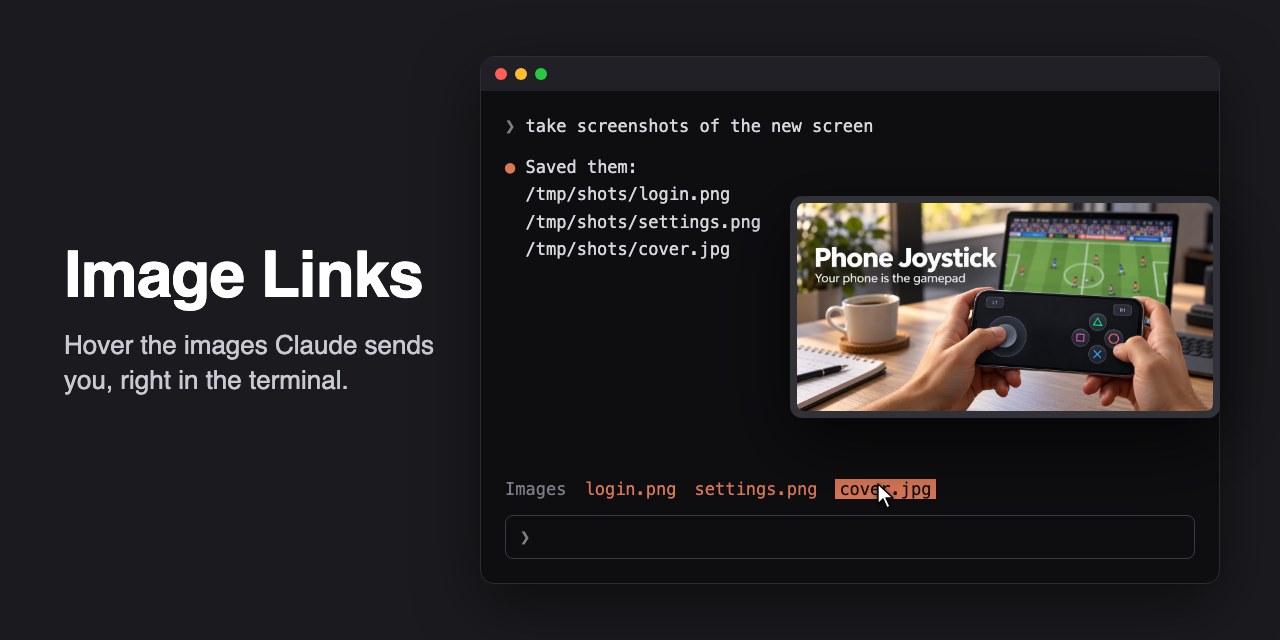
A Claude Code mod that turns the images Claude sends you into chips above the prompt. Hover one and the picture shows next to the pointer; click it and it opens in Preview. I work in Claude Code in iTerm2 all day and Claude keeps sending me screenshots, of a screen it just built or of a test run. The image-preview mod shows the images I paste, not the ones Claude sends, which stayed as file paths I had to open by hand.
SendUserFile and the image paths it writes in its answer (.png, .jpg, .jpeg, .gif, .webp), as long as they exist on disk.Images by default).The quickest way: paste this into a Claude Code session.
Install the image-links mod from https://github.com/aerodiduch/claude-image-links by running
`claude plugin install image-links --marketplace aerodiduch/claude-image-links`.
Then check whether my Claude Code settings have "tui": "fullscreen", which the mod needs
for hovering. If they don't, tell me and ask before changing it. Finally, tell me to start
a new session so the mod loads.
Or by hand. You need Claude Code with mods (tested on 2.1.306) and its fullscreen interface: "tui": "fullscreen" in your settings, or set it with /config. Hovering needs the mouse, and the terminal only reports it in fullscreen.
At the prompt of a terminal session:
/plugin install image-links --marketplace aerodiduch/claude-image-linksAnswer y to add the marketplace and press Enter to install it for your user. From a shell:
claude plugin install image-links --marketplace aerodiduch/claude-image-linksWhen Claude's answer names an image that exists, or Claude sends you one, its name shows above the prompt:
Images  login.png  settings.png  cover.jpg
❯To change the word before the chips, open /config and set Band label under image-links.
/… or ~/…) or does not exist. A relative path is only taken from SendUserFile, which resolves it from the project folder.The mod runs two programs, both with the image's path and nothing else: osascript to draw the preview window, and open -a Preview when you click. It checks whether the paths in Claude's answer exist on disk, and reads nothing else. It makes no network requests.
A Claude Code hooks module in TypeScript. It reads the image paths from each answer (turn.complete) and from SendUserFile calls (tool.call), keeps them in the session's state, and draws them above the prompt (ui.render on AbovePrompt). Each chip is a small client module that reports when the pointer comes onto it, leaves it or clicks it. The window is an AppKit panel drawn by JavaScript for Automation through osascript; it and the chip are adapted from image-preview by Miguel Ángel Durán.
claude plugin validate .
claude plugin test .
The tests check that an answer's image paths become chips (and a path that does not exist does not), that a new prompt clears them, that a file sent with SendUserFile shows up from a relative path, and that the band label option works.
MIT. hooks/window.ts and hooks/chip.tsx are adapted from better-claude, MIT, with its license in hooks/better-claude-LICENSE.
hooks/register.tsx 162 lines1// The images of the last turn as chips above the prompt: the files Claude sent (SendUserFile) and
2// the image paths in its answer. The pointer on a chip shows the picture in a window by the pointer
3// (macOS); a click opens it in Preview. Sending a new prompt clears them.
4//
5// Hovering needs the mouse, so it needs Claude Code's fullscreen interface.
6import { atom, read, update } from 'claude-code'
7import type { EngineInterface, Register } from 'claude-code'
8
9import type { ImageList } from '../types'
10
11import { MACOS } from './window'
12
13type Engine = EngineInterface
14
15const images = atom({ plugin: 'image-links', key: 'images' } as const, [] as ImageList)
16
17const IMAGE = /\.(png|jpe?g|gif|webp)$/i
18// A path in an answer: absolute or under ~, up to a space, a quote, a backtick or a bracket. A
19// period right after it ends a sentence, it is not part of the name.
20const PATH = /(?:~\/|\/)[^\s`'"()<>[\]]+?\.(?:png|jpe?g|gif|webp)(?![\w-])/gi
21const MAX_IMAGES = 8
22const MAX_LABEL = 36
23// The longest side of the picture in its window, in points, and the most seconds it stays.
24const WINDOW_SIZE = 800
25const WINDOW_LIFE = 120
26
27let isMac = false
28let home = ''
29let cwd = ''
30let hovered: string | null = null
31let window: { path: string; isOpen: boolean } | undefined
32
33const nameOf = (path: string) => path.slice(path.lastIndexOf('/') + 1)
34const labelOf = (path: string) => {
35 const name = nameOf(path)
36 return name.length <= MAX_LABEL ? name : `${name.slice(0, MAX_LABEL - 1)}…`
37}
38
39/** The paths that are images on this disk, absolute, each once. */
40async function imagesIn ($: Engine, paths: readonly string[]) {
41 const found: string[] = []
42 for (const raw of paths) {
43 const path = raw.startsWith('~/') ? home + raw.slice(1) : raw.startsWith('/') ? raw : `${cwd}/${raw}`
44 if (!IMAGE.test(path) || found.includes(path)) continue
45 if (await $.fs.exists(path).catch(() => false)) found.push(path)
46 }
47 return found
48}
49
50/** Adds images to the band, the newest last, keeping the last MAX_IMAGES. */
51async function add ($: Engine, paths: readonly string[]) {
52 const found = await imagesIn($, paths)
53 if (found.length === 0) return
54 await update($, images, list => [...list.filter(path => !found.includes(path)), ...found].slice(-MAX_IMAGES))
55}
56
57/** Shows the picture in a borderless window by the pointer, until closeWindow. */
58async function openWindow ($: Engine, path: string) {
59 if (!isMac || (window?.path === path && window.isOpen)) return
60 closeWindow()
61 const opening = { path, isOpen: true }
62 window = opening
63 const env = { IMAGE_PREVIEW_FILE: path, IMAGE_PREVIEW_SIZE: String(WINDOW_SIZE), IMAGE_PREVIEW_LIFE: String(WINDOW_LIFE) }
64 try {
65 // The program says `.` ten times a second: each wakes this loop to see whether it was closed,
66 // and leaving the loop ends the program.
67 for await (const chunk of $.process.spawn({ argv: ['osascript', '-l', 'JavaScript', '-e', MACOS], env })) {
68 void chunk
69 if (!opening.isOpen) break
70 }
71 } catch {
72 // The program ended on its own (its life is over, or it could not read the picture).
73 }
74 if (window === opening) window = undefined
75}
76
77function closeWindow () {
78 if (window) window.isOpen = false
79 window = undefined
80}
81
82async function clear ($: Engine) {
83 closeWindow()
84 hovered = null
85 await update($, images, () => [])
86}
87
88export const register: Register = (on, options) => {
89 const label = typeof options.label === 'string' && options.label.trim() ? options.label.trim() : 'Images'
90
91 on('session.start', async ($, e, next) => {
92 const result = await next(e)
93 home = (await $.env.get('HOME')) ?? ''
94 cwd = await $.session.cwd()
95 isMac = (await $.process.run(['uname', '-s']).catch(() => undefined))?.stdout.trim() === 'Darwin'
96 return result
97 })
98
99 // A new prompt starts a new set: what the last turn showed was for the last question.
100 on('prompt.submit', async ($, e, next) => {
101 const result = await next(e)
102 if (e.origin.kind === 'composer') await clear($)
103 return result
104 }).catch(($, e, next) => next(e))
105
106 on('tool.call', { tool: 'SendUserFile' }, async ($, e, next) => {
107 const result = await next(e)
108 if (result.deny === undefined && result.isError !== true) await add($, e.files).catch(() => undefined)
109 return result
110 }).catch(($, e, next) => next(e))
111
112 // The image paths the answer names, in the main conversation only (a subagent's answer is not shown).
113 on('turn.complete', async ($, e, next) => {
114 const result = await next(e)
115 if (e.agentId === undefined) await add($, [...e.answer.matchAll(PATH)].map(match => match[0])).catch(() => undefined)
116 return result
117 })
118
119 on('ui.message', async ($, e, next) => {
120 const result = await next(e)
121 const chip = /^img:(\d+)$/.exec(e.element)
122 if (!chip) return result
123 const path = (await read($, images))[Number(chip[1])]
124 if (!path) return result
125 const data = e.data as { isOver?: unknown; isClicked?: unknown } | null
126 if (data?.isClicked === true) {
127 // Preview takes the screen: a window left open would stand over it.
128 closeWindow()
129 hovered = null
130 if (isMac) void $.process.run(['open', '-a', 'Preview', path]).catch(() => undefined)
131 return result
132 }
133 if (data?.isOver === true) {
134 hovered = path
135 void openWindow($, path)
136 } else if (hovered === path) {
137 hovered = null
138 closeWindow()
139 }
140 return result
141 })
142
143 // Above the prompt: one chip per image. Off fullscreen the terminal reports no pointer, so there
144 // is nothing to hover and the band stays out.
145 on('ui.render', { component: 'AbovePrompt' }, async ($, e, next) => {
146 if (e.surface !== 'terminal' || e.props.hasSurvey || e.viewport?.isFullscreen === false) return next(e)
147 const list = await read($, images)
148 if (list.length === 0) return next(e)
149 const { Box, Client, Text } = $.ui.resolve(e)
150 const below = await next(e)
151 return (
152 <Box flexDirection="column">
153 {below}
154 <Box flexDirection="row" flexWrap="wrap" columnGap={2}>
155 <Text dimColor>{label}</Text>
156 {list.map((path, i) => <Client key={`img:${i}`} module="./chip.tsx" props={{ label: labelOf(path) }} />)}
157 </Box>
158 </Box>
159 )
160 })
161}
162hooks/window.ts 74 lines1// Adapted from image-preview in midudev/better-claude (MIT, (c) 2026 Miguel Ángel Durán): its macOS
2// window, alone. Run by `osascript` with IMAGE_PREVIEW_FILE (the picture), IMAGE_PREVIEW_SIZE (its
3// longest side at most, in points) and IMAGE_PREVIEW_LIFE (the most seconds it stays) in the
4// environment. It writes `shown` once the window is up, then a `.` every tenth of a second, and ends
5// when nobody reads them. The window never takes the focus or the pointer.
6
7export const MACOS = String.raw`
8ObjC.import('Cocoa')
9
10function run () {
11 const env = $.NSProcessInfo.processInfo.environment
12 const read = key => { const value = env.objectForKey(key); return value.isNil() ? '' : ObjC.unwrap(value) }
13 const say = text => $.NSFileHandle.fileHandleWithStandardOutput.writeData($(text + '\n').dataUsingEncoding($.NSUTF8StringEncoding))
14 const largest = Number(read('IMAGE_PREVIEW_SIZE')) || 800
15 // An accessory app: no Dock icon, never the active one.
16 $.NSApplication.sharedApplication.setActivationPolicy(1)
17 const image = $.NSImage.alloc.initWithContentsOfFile(read('IMAGE_PREVIEW_FILE'))
18 if (image.isNil() || image.representations.count === 0) { say('error: cannot read the image'); return }
19 const pixels = image.representations.firstObject
20 const mouse = $.NSEvent.mouseLocation
21 const screens = $.NSScreen.screens
22 let screen = $.NSScreen.mainScreen
23 for (let i = 0; i < screens.count; i++) {
24 const frame = screens.objectAtIndex(i).frame
25 if (mouse.x >= frame.origin.x && mouse.x < frame.origin.x + frame.size.width && mouse.y >= frame.origin.y && mouse.y < frame.origin.y + frame.size.height) screen = screens.objectAtIndex(i)
26 }
27 const area = screen.visibleFrame
28 let width = pixels.pixelsWide / screen.backingScaleFactor
29 let height = pixels.pixelsHigh / screen.backingScaleFactor
30 const fit = Math.min(1, largest / Math.max(width, height), (area.size.width * 0.7) / width, (area.size.height * 0.7) / height)
31 width = Math.round(width * fit)
32 height = Math.round(height * fit)
33 const pad = 6
34 const gap = 18
35 const outer = { width: width + pad * 2, height: height + pad * 2 }
36 const top = area.origin.y + area.size.height
37 const right = area.origin.x + area.size.width
38 // Above the pointer and to its right; under it, or to its left, where there is no room: never
39 // over the pointer, which stays on the terminal.
40 let x = mouse.x + gap
41 let y = mouse.y + gap
42 if (y + outer.height > top) y = mouse.y - gap - outer.height
43 if (x + outer.width > right) x = mouse.x - gap - outer.width
44 x = Math.max(area.origin.x, Math.min(x, right - outer.width))
45 y = Math.max(area.origin.y, Math.min(y, top - outer.height))
46 // Borderless and non-activating; over every app window, on every space, full-screen ones too.
47 const panel = $.NSPanel.alloc.initWithContentRectStyleMaskBackingDefer($.NSMakeRect(x, y, outer.width, outer.height), 128, 2, false)
48 panel.level = 25
49 panel.ignoresMouseEvents = true
50 panel.hasShadow = true
51 panel.opaque = false
52 panel.backgroundColor = $.NSColor.clearColor
53 panel.collectionBehavior = 1 | 16 | 256
54 const backdrop = $.NSVisualEffectView.alloc.initWithFrame($.NSMakeRect(0, 0, outer.width, outer.height))
55 backdrop.material = 13
56 backdrop.state = 1
57 backdrop.wantsLayer = true
58 backdrop.layer.cornerRadius = 10
59 backdrop.layer.masksToBounds = true
60 const view = $.NSImageView.alloc.initWithFrame($.NSMakeRect(pad, pad, width, height))
61 view.image = image
62 view.imageScaling = 3
63 backdrop.addSubview(view)
64 panel.contentView = backdrop
65 panel.orderFrontRegardless
66 say('shown')
67 const end = Date.now() + (Number(read('IMAGE_PREVIEW_LIFE')) || 120) * 1000
68 while (Date.now() < end) {
69 $.NSRunLoop.currentRunLoop.runUntilDate($.NSDate.dateWithTimeIntervalSinceNow(0.1))
70 say('.')
71 }
72}
73`
74hooks/chip.tsx 41 lines1// Adapted from image-preview in midudev/better-claude (MIT, (c) 2026 Miguel Ángel Durán).
2// The surface module of each chip: it says when the pointer comes onto it and leaves, so the hooks
3// module opens and closes the preview window, and when it is clicked, so the image opens.
4import type { ClientModule } from 'claude-code'
5
6type Props = { label: string }
7
8const REPEAT_MS = 50
9
10const Chip: ClientModule<Props, { isOver: boolean; isPressed?: boolean }> = (props, surface) => {
11 surface.onPointer(event => {
12 // A click is the left button let go over the chip it went down on.
13 if (event.type === 'down') {
14 if (event.button === 'left') surface.setState({ isOver: true, isPressed: true })
15 return
16 }
17 if (event.type === 'up') {
18 // A region not laid out yet (0 by 0) says nothing of where the pointer is.
19 const isInside = surface.columns === 0 || (event.x >= 0 && event.y >= 0 && event.x < surface.columns && event.y < surface.rows)
20 if (surface.state?.isPressed && isInside) surface.post({ isOver: true, isClicked: true })
21 surface.setState({ isOver: isInside })
22 return
23 }
24 const isOver = event.type !== 'leave'
25 surface.post({ isOver })
26 if (isOver !== (surface.state?.isOver ?? false)) surface.setState({ isOver, isPressed: surface.state?.isPressed })
27 // Going straight from one chip to the next, the leave and the enter post in one frame and the
28 // later replaces the other: the enter says so again a frame on.
29 if (event.type === 'enter') {
30 const stop = surface.every(REPEAT_MS, () => {
31 stop()
32 if (surface.state?.isOver) surface.post({ isOver: true })
33 })
34 }
35 })
36 const { Text } = surface.elements
37 return <Text color="claude" inverse={surface.state?.isOver === true}>{props.label}</Text>
38}
39
40export default Chip
41types/index.d.ts 9 lines1/** Absolute paths of the images of the last turn, oldest first. */
2export type ImageList = string[]
3
4declare module 'claude-code' {
5 interface PluginState {
6 'image-links': { images: ImageList }
7 }
8}
9